Can I run Direct3D12 on my system?
Without buying 3DMark (cheapest is Advanced Edition at $24.95), you won't get the DX12 call overhead comparison test. It's also a massive download and I really just want to find out if I could run DX12 on my system!
Essentially, I wanted a Direct3D12 test / sample app that has been compiled into an executable that I could just run. Google didn't turn up anything so I decided it's easier if I compiled one myself from the SharpDX 3.0.0 alpha 2 Direct3D12 Hello World example.
So here it is.
Dx12Test requires .NET Framework 4.5. You can give it a parameter from command line to pick which adapter to initialize (0=primary (default), 1=secondary...). If your GPU doesn't support DX12, you'll get a cryptic (it's just saying it's failed to initialize DX12) error message upon starting up.
Enjoy!
Tuesday, August 11, 2015


Wednesday, July 8, 2015
23.976 Judder
Preface
I remember spending countless hours trying to get my graphics card to hit exactly 23.976Hz when I first got involved in the HTPC scene years ago but only to find out you need to compensate for audio clock deviations as well. So the whole experiment starts all over again. These are the countless hours I'd never get back and I hope by writing this little post I'll save you the same trouble (and potentially lots of hours of your life).
The Problem
When you play 23.976 fps materials on a 60Hz display, you get what's called a "2:3 pulldown". Frames have to be played unevenly and we all know that. MPDN (Media Player .NET) has a feature called Fluid Motion that will get rid of the judder at the expense of clarity so it's generally advisable not to enable it if your display supports 23.976Hz refresh rate. In fact, MPDN's Fluid Motion is disabled by default if the display refresh rate is the same as (or a multiple of - more on that later) your video frame rate.
This is where the problem lies. It is terribly hard to get your graphics card to output the refresh rate you want and you often have to spend a lot of time tinkering with the custom refresh rates to get it right. You also have to take into account of the fact that video is played back at the speed of the audio (you get lip-sync problem otherwise) and not your system clock. MPDN calls this the reference clock.
What this means is you can't simply target 23.976Hz - you have to target 23.976Hz +/- ref clock. So even if your graphics card does 23.976Hz exactly out of the box, you'll still have the same rate mismatch (unless your reference clock is exactly 0%). Once you've corrected the mismatch for 23.976Hz, you have 24Hz, 30Hz, 50Hz, and 60Hz all requiring the same tedious corrections. Ref clock also changes with time and only gets more accurate the longer you let it play continuously - so you usually have to spend 5-10 minutes to find out if you've got the new settings right.
All of that assuming you know how to calculate your target refresh rate (video frame rate + ref clock deviation) in the first place and from what I've seen in the forum, most people don't.
The Solution
ReClock was the solution for a lot of people back in the days (myself included) but as we moved to 64-bit, ReClock is still firmly stuck in the 32-bit land. Since SlySoft (the creator of ReClock) have no plans to work on a 64-bit version, an alternative was clearly required. In fact, it is one of the most requested feature for MPDN for quite some time now (mostly via PMs).
Rather than trying to get the display to match our video, why not get the video to match the display instead? We do it for resolution (i.e. scaling) so why not do the same for refresh rate? Rate Tuner was thus created and comes with a calculator that automatically matches your video to your display refresh rate. Rate Tuner serves as a ReClock replacement and has the added benefit of it being fully integrated into MPDN.
Visit MPDN Extensions Wiki for more information about Rate Tuner.
I remember spending countless hours trying to get my graphics card to hit exactly 23.976Hz when I first got involved in the HTPC scene years ago but only to find out you need to compensate for audio clock deviations as well. So the whole experiment starts all over again. These are the countless hours I'd never get back and I hope by writing this little post I'll save you the same trouble (and potentially lots of hours of your life).
The Problem
When you play 23.976 fps materials on a 60Hz display, you get what's called a "2:3 pulldown". Frames have to be played unevenly and we all know that. MPDN (Media Player .NET) has a feature called Fluid Motion that will get rid of the judder at the expense of clarity so it's generally advisable not to enable it if your display supports 23.976Hz refresh rate. In fact, MPDN's Fluid Motion is disabled by default if the display refresh rate is the same as (or a multiple of - more on that later) your video frame rate.
This is where the problem lies. It is terribly hard to get your graphics card to output the refresh rate you want and you often have to spend a lot of time tinkering with the custom refresh rates to get it right. You also have to take into account of the fact that video is played back at the speed of the audio (you get lip-sync problem otherwise) and not your system clock. MPDN calls this the reference clock.
What this means is you can't simply target 23.976Hz - you have to target 23.976Hz +/- ref clock. So even if your graphics card does 23.976Hz exactly out of the box, you'll still have the same rate mismatch (unless your reference clock is exactly 0%). Once you've corrected the mismatch for 23.976Hz, you have 24Hz, 30Hz, 50Hz, and 60Hz all requiring the same tedious corrections. Ref clock also changes with time and only gets more accurate the longer you let it play continuously - so you usually have to spend 5-10 minutes to find out if you've got the new settings right.
All of that assuming you know how to calculate your target refresh rate (video frame rate + ref clock deviation) in the first place and from what I've seen in the forum, most people don't.
The Solution
ReClock was the solution for a lot of people back in the days (myself included) but as we moved to 64-bit, ReClock is still firmly stuck in the 32-bit land. Since SlySoft (the creator of ReClock) have no plans to work on a 64-bit version, an alternative was clearly required. In fact, it is one of the most requested feature for MPDN for quite some time now (mostly via PMs).
Rather than trying to get the display to match our video, why not get the video to match the display instead? We do it for resolution (i.e. scaling) so why not do the same for refresh rate? Rate Tuner was thus created and comes with a calculator that automatically matches your video to your display refresh rate. Rate Tuner serves as a ReClock replacement and has the added benefit of it being fully integrated into MPDN.
Visit MPDN Extensions Wiki for more information about Rate Tuner.
Tuesday, September 9, 2014
State of Legacy Drivers 2014: AMD vs NVIDIA
Preface
While they are both categorically in the legacy cards section of their respective manufacturers as of the date of this post, the cards I have do not provide for a completely fair comparison: ATI (AMD) HD 4350 (PCIe x16) vs NVIDIA 8400GS (PCIe x1).
The AMD card (GPU release date 30 Sep 2008) is one generation ahead of the NVIDIA one (17 Apr 2007). Not only that, the 8400GS is handicapped by its PCI-E x1 1.1 bus interface (HD 4350 has a PCI-E x16 2.0 interface). Everything hence shows that the AMD card is way superior, and it truly is.
| AMD HD 4350 | NVIDIA 8400GS | |
|---|---|---|
| Technology | 55nm | 80nm |
| Release Date | Sep 30, 2008 | Apr 17, 2007 |
| Transistors | 242M | 210M |
| Bus Interface | PCI-E 2.0 x16 @ x16 2.0 | PCI-E 1.1 x16 @ x1 1.1 |
| Memory Size | 512 MB | 256 MB |
| DirectX Support | 10.1 / SM4.1 | 10.0 / SM4.0 |

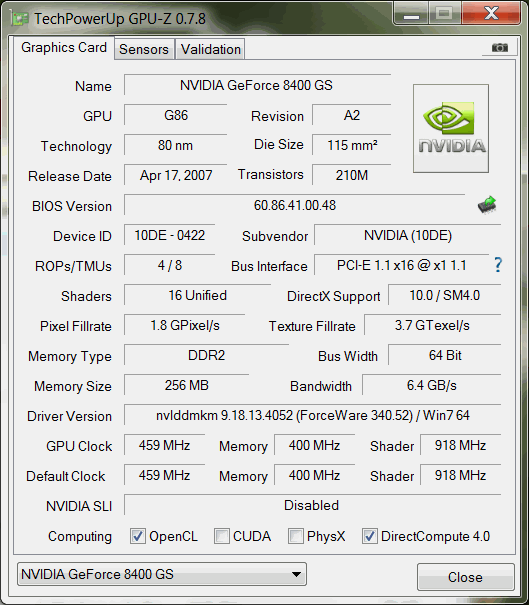
Drivers - Availability
Knowing that the AMD is a superior card, how does its drivers compare with NVIDIA's? A graphics card cannot function without its drivers after all.
With the 8400GS, it was as easy to install drivers as it is for the latest NVIDIA graphics cards - GeForce drivers 340.52 thus installed without a fuss. AMD have have dropped the HD 4350 drivers from the latest drivers distribution. It directed me to its legacy drivers page and the latest version happens to be 13.4 BETA! A quick Google search seems to suggest that 13.9 is simply the WHQL'd version of 13.4. So I downloaded v13.9 and installed it. All good so far.
Drivers - Quality
I'm basing my assessment off a Direct3D 9 Shader Model 3.0 Video Renderer I wrote -- Media Player .NET (MPDN). The reason I'm doing this is because I know what my code does intimately and how it should work.
Let's get onto testing the cards then. Both cards were tested with the MPDN default settings on a 1280x1024 monitor at 50Hz. The NVIDIA card ran without any issues (render time of ~19ms). The AMD card however, kept causing Windows 7 to complain "Windows has detected that your computer's performance is slow" and if MPDN kept on playing, Windows reverted back to the basic colour scheme (turned off Aero mode). Turning on MPDN's on-screen player stats, it was immediately obvious: render and present times were all over the place! However, once full screen exclusive mode was activated, render time immediately settled at ~10ms.
I was baffled. As it turns out, AMD drivers have a problem with 50Hz monitors. Even without running MPDN, you could see Windows 7 DWM dropping frames as you move just a Windows Explorer window (it was visibly jerky)! I then switched the monitor to 60Hz to see if it exhibits the same problem -- Not at all! At 60Hz, it ran fine, mostly. Occasionally render and present times still shot up and caused MPDN to drop frames (which did not happen on the NVIDIA card), but it mostly ran fine.
Without spending more time into my investigations (although I did ran several other versions of legacy drivers from 12.11 HotFix to 13.1 modded ones to no avail), I'll have to point my fingers at AMD. Among the three major GPU vendors, AMD have the worst drivers. Yes, Intel is one of the three vendors and they have much better drivers than AMD! Oh how the tides have turned in recent years!
I have no evidence to suggest that this bug affects all of the AMD HD 4000 series GPUs but given they were based of the foundation chip RV770, I would not be surprised if the entire line suffers from this very bug. Furthermore, with AMD's track record (i.e. absolute disinterest) in fixing bugs in their legacy drivers (and even drivers for their latest GPUs), it is likely that this will never get fixed.
On my test PC, the Catalyst drivers face an even more daunting task - they need to get the graphics card to coexist with an Intel GPU (i.e. Main monitor is hooked up to the Intel GPU while a secondary monitor is hooked up to the AMD card). This particular setup worked beautifully with the NVIDIA 8400GS. With the AMD HD 4350, however, it would always cause Windows 7 to revert to basic colour scheme when you have it render the frames but present it on another GPU (i.e. rendering is done on the AMD GPU and then gets presented on the Intel GPU in windowed mode). On the other hand, both Intel and NVIDIA drivers worked well either directions (rendering on Intel, present on NVIDIA and vice versa).
This particular setup cannot be considered unorthodox in this day and age. Unfortunately, AMD cannot seem to get their drivers to work properly under any circumstances besides the monitor refresh rate set at 60Hz and on a single GPU setup. You have been warned: Deviate at your own peril.
Conclusion
While the AMD HD 4350 card is definitely a superior card to the NVIDIA 8400GS, it suffers from abysmal driver quality. This makes it completely useless as a HTPC card where you would want to set your TV frequency to match the video being played. In the recent releases of MPDN, the AMD card is also exhibiting artefacts running PixelShader code that both Intel and NVIDIA GPUs have no problems running. I have yet to investigate into this issue so this will be an article for another day. Given my experience as a software developer, I would stay away from AMD graphics cards if I were you.
Thursday, June 27, 2013
JMicron JMB36x RAID Status Monitor
I recently worked on a project that requires scheduled status monitoring of a RAID1 (mirrored) volume facilitated via the inexpensive JMicron JMB36x chipset.
To my disbelief, JMicron's xRaidSetup (the facility to create RAID volumes) does not have the ability to report RAID status via email notification which other brands such as Marvell do (I believe Silicon Image as well). So, I had to do it the hard way - reverse engineer xRaidSetup.exe and painstakingly via dis-assembly figure out what it does to get a RAID volume's status (all I wanted to know was if it's running normally!).
I've created xRaidChecker (download) for those who needed the same feature. It's a console application that returns a number indicating the RAID status of the first RAID volume (currently only supports one volume).
Return value of 1 indicates volume is running normally. Any other values indicate an 'Abnormal' status according to xRaidSetup.exe. I'm convinced, however, that there must be specific values that indicate statuses such as 'Rebuild Required' and 'Rebuilding'. If you encounter a return value other than 1, do find out what it means and let me know.
p.s. xRaidChecker needs to be run in elevated command prompt (run as Administrator), or, as I've got it set up, via Task Scheduler running with System privileges and sending out email notifications via a batch file.
p.p.s. JMicron's xRaidSetup must already be installed and your RAID volume set up before you run xRaidChecker (it uses xRaidAPI.dll).
To my disbelief, JMicron's xRaidSetup (the facility to create RAID volumes) does not have the ability to report RAID status via email notification which other brands such as Marvell do (I believe Silicon Image as well). So, I had to do it the hard way - reverse engineer xRaidSetup.exe and painstakingly via dis-assembly figure out what it does to get a RAID volume's status (all I wanted to know was if it's running normally!).
I've created xRaidChecker (download) for those who needed the same feature. It's a console application that returns a number indicating the RAID status of the first RAID volume (currently only supports one volume).
Return value of 1 indicates volume is running normally. Any other values indicate an 'Abnormal' status according to xRaidSetup.exe. I'm convinced, however, that there must be specific values that indicate statuses such as 'Rebuild Required' and 'Rebuilding'. If you encounter a return value other than 1, do find out what it means and let me know.
p.s. xRaidChecker needs to be run in elevated command prompt (run as Administrator), or, as I've got it set up, via Task Scheduler running with System privileges and sending out email notifications via a batch file.
p.p.s. JMicron's xRaidSetup must already be installed and your RAID volume set up before you run xRaidChecker (it uses xRaidAPI.dll).
Wednesday, February 20, 2013
Building ICU (ICU4C) on Cygwin
Now that MCP relies on ICU 50 for its String class (and likely other globalization related classes in the future), we need to build and install ICU first in order to get MCP to compile on Cygwin.
For some reason, the default build instructions does not work. Make will error out (-f pkgdataMakefile is unrecognized by /bin/sh). The problem is with ICU's runConfigureICU script which doesn't properly configure compiler / linker / make flags for Cygwin. Worse, if you follow the instructions and ran runConfigureICU Cygwin, there will be more errors you'll have to deal with.
This is what I had to do instead:
runConfigureICU Linux
export MAKE=make
Notice the first line after you run runConfigureICU Linux. It exports CC, CXX, CFLAGS and CXXFLAGS appropriately. The runConfigureICU Cygwin version however does not. All that the former was missing was a MAKE export. Once you've done that, you can go ahead and make.
For some reason, the default build instructions does not work. Make will error out (-f pkgdataMakefile is unrecognized by /bin/sh). The problem is with ICU's runConfigureICU script which doesn't properly configure compiler / linker / make flags for Cygwin. Worse, if you follow the instructions and ran runConfigureICU Cygwin, there will be more errors you'll have to deal with.
This is what I had to do instead:
runConfigureICU Linux
export MAKE=make
Notice the first line after you run runConfigureICU Linux. It exports CC, CXX, CFLAGS and CXXFLAGS appropriately. The runConfigureICU Cygwin version however does not. All that the former was missing was a MAKE export. Once you've done that, you can go ahead and make.
Tuesday, November 20, 2012
Introducing Managed C++ for GCC
I was not particularly impressed with Boost's hack of getting C++ to have some sort of automatic memory management via boost::shared_ptr. Not only does it suffer from circular references, its handling of 'this' pointer is also dismally complicated especially for classes with multiple inheritance. Yes, there may be solutions out there for these common boost problems, **but** it should not have been a problem to begin with!
Two years ago, I created a .NET like framework for C++ Builder with precise GC and found it to be a lot more straight forward to use compared to Boost. Ironically, C++ is actually better suited to a precise garbage collector than it is to smart pointers. For example, have you inadvertently called shared_from_this() (indirectly, of course) from a class' constructor? This is just another one of many pesky pitfalls C++ programmers have to constantly remind themselves. Isn't there enough pitfalls in the highly ambiguous language already? With sequence points, most vexing parse and whatnot, the C++ language itself is already too complicated for its own good. Herb Sutter certainly thought it's a good idea to add another layer of complexity to that by championing Boost.
Sure, Boost is much more than just shared_ptr. In fact, I intend to make this Managed C++ framework completely compatible with Boost, replacing all the various different boost pointers (e.g. shared_ptr, intrusive_ptr, unique_ptr/auto_ptr, scoped_ptr, shared_array, scoped_array, weak_ptr) with their GC counterparts and dropping most of the nonsense along the way. We only need 2 types of GC pointers -- gc_ptr and gc_array -- along with a WeakReference class for weak_ptr replacement.
In my future blogs, I'll explain more about the unnecessary complexities added by Boost's smart pointer and how gc_ptr and gc_array transparently and naturally avoid all these complexities.
In the meantime, I have released MCP -- Managed C++ for GCC under the GPLv3 license. Head to the MCP website on SourceForge for more information.
Two years ago, I created a .NET like framework for C++ Builder with precise GC and found it to be a lot more straight forward to use compared to Boost. Ironically, C++ is actually better suited to a precise garbage collector than it is to smart pointers. For example, have you inadvertently called shared_from_this() (indirectly, of course) from a class' constructor? This is just another one of many pesky pitfalls C++ programmers have to constantly remind themselves. Isn't there enough pitfalls in the highly ambiguous language already? With sequence points, most vexing parse and whatnot, the C++ language itself is already too complicated for its own good. Herb Sutter certainly thought it's a good idea to add another layer of complexity to that by championing Boost.
Sure, Boost is much more than just shared_ptr. In fact, I intend to make this Managed C++ framework completely compatible with Boost, replacing all the various different boost pointers (e.g. shared_ptr, intrusive_ptr, unique_ptr/auto_ptr, scoped_ptr, shared_array, scoped_array, weak_ptr) with their GC counterparts and dropping most of the nonsense along the way. We only need 2 types of GC pointers -- gc_ptr and gc_array -- along with a WeakReference class for weak_ptr replacement.
In my future blogs, I'll explain more about the unnecessary complexities added by Boost's smart pointer and how gc_ptr and gc_array transparently and naturally avoid all these complexities.
In the meantime, I have released MCP -- Managed C++ for GCC under the GPLv3 license. Head to the MCP website on SourceForge for more information.
Tuesday, October 23, 2012
Building Cygwin GCC 4.5.3 with --enable-plugin
Many people have tried building GCC 4.5.3 on Cygwin with the configure flag of --enable-plugin only to find that make subsequently fails with the following errors.
checking for -rdynamic... objdump: conftest: not a dynamic object no
checking for library containing dlopen... none required
checking for -fPIC -shared... no
configure: error:
Building GCC with plugin support requires a host that supports
-fPIC, -shared, -ldl and -rdynamic.
make[1]: *** [configure-gcc] Error 1
It appears that GCC would not build with --enable-plugin on Cygwin as -rdynamic and -fPIC are not applicable for a Windows PE.
Why would it need -rdynamic and -fPIC? I honestly thought those requirements are purely artificial as it would be absolutely possible to create a DLL under Windows and there is no reason why GCC can't use it.
So I set about finding out how this could be done and eventually found two articles [1][2] that allowed me to get to a working solution. I've combined the two articles to create these procedures.
Note: Start the following steps from a directory where you will have all your GCC files location in it.
1) Download and extract helper files I've put together which you'll be using later.
# obtain Cygwin GCC Plugin helper files
wget http://www.zachsaw.com/downloads/cygwin_gcc_plugin/cygwin_gcc_plugin_files.tar.bz2
tar -jxvf cygwin_gcc_plugin_files.tar.bz2
2) Run the following commands
# obtain GCC 4.5.3 (see http://gcc.gnu.org/mirrors.html for alternate mirrors)
wget http://www.netgull.com/gcc/releases/gcc-4.5.3/gcc-4.5.3.tar.bz2
tar -jxvf gcc-4.5.3.tar.bz2
# apply patches
cd gcc-4.5.3
patch -p0 < ../cygwin_gcc_plugin/finish_decl.diff
patch -p0 < ../cygwin_gcc_plugin/cygwin_enable_plugin.diff
patch -p0 < ../cygwin_gcc_plugin/cygwin_enable_plugin_cc1.diff
patch -p0 < ../cygwin_gcc_plugin/cygwin_enable_plugin_cc1plus.diff
# build GCC
cd ..
mkdir gcc-objdir
mkdir gcc-dist
cd gcc-objdir
../gcc-4.5.3/configure --disable-bootstrap --enable-version-specific-runtime-libs --enable-static --enable-shared --enable-shared-libgcc --disable-__cxa_atexit --with-dwarf2 --disable-sjlj-exceptions --enable-languages=c,c++,lto --enable-lto --enable-libssp --enable-plugin --enable-threads=posix --prefix=$PWD/../gcc-dist
make
make install
cd ..
*** make took 2 hours on my machine!
3) Create symlink for g++-plugin and gcc-plugin in /usr/bin to point to the newly built g++ and gcc respectively.
4) Set environment vars for $GCC_PLUGIN_DIR and $builtgcc.
export GCC_PLUGIN_DIR=`g++-plugin -print-file-name=plugin`
export builtgcc=<path>/gcc-objdir
5) Generate import libraries.
mkdir $GCC_PLUGIN_DIR/lib
cygwin_gcc_plugin/lazyimp.pl $GCC_PLUGIN_DIR/lib/libcc1.a $builtgcc/gcc/cc1.def
cygwin_gcc_plugin/lazyimp.pl $GCC_PLUGIN_DIR/lib/libcc1plus.a $builtgcc/gcc/cc1plus.def
This will take some time.
6) Compile dll.c and archive it into libcc1.a and libcc1plus.a
gcc-plugin -O3 -Wall cygwin_gcc_plugin/dll.c -c
ar rcs $GCC_PLUGIN_DIR/lib/libcc1.a dll.o
ar rcs $GCC_PLUGIN_DIR/lib/libcc1plus.a dll.o
7) You now have both libcc1.a (for C) and libcc1plus.a (for C++) that you can link to when you build your gcc plugin.
To build a plugin:
g++-plugin -c -I`g++-plugin -print-file-name=plugin`/include main.cpp
g++-plugin -fPIC -shared -Wl,-e,_lazymain@12 -L`g++-plugin -print-file-name=plugin`/lib -o plugin.dll main.o -lcc1plus
Or one step build and link:
g++-plugin -shared -Wl,-e,_lazymain@12 -I`g++-plugin -print-file-name=plugin`/include -L`g++-plugin -print-file-name=plugin`/lib -o plugin.dll main.cpp -lcc1plus
Test the plugin:
g++-plugin -S -fplugin=./plugin.dll test.cpp
checking for -rdynamic... objdump: conftest: not a dynamic object no
checking for library containing dlopen... none required
checking for -fPIC -shared... no
configure: error:
Building GCC with plugin support requires a host that supports
-fPIC, -shared, -ldl and -rdynamic.
make[1]: *** [configure-gcc] Error 1
It appears that GCC would not build with --enable-plugin on Cygwin as -rdynamic and -fPIC are not applicable for a Windows PE.
Why would it need -rdynamic and -fPIC? I honestly thought those requirements are purely artificial as it would be absolutely possible to create a DLL under Windows and there is no reason why GCC can't use it.
So I set about finding out how this could be done and eventually found two articles [1][2] that allowed me to get to a working solution. I've combined the two articles to create these procedures.
Note: Start the following steps from a directory where you will have all your GCC files location in it.
1) Download and extract helper files I've put together which you'll be using later.
# obtain Cygwin GCC Plugin helper files
wget http://www.zachsaw.com/downloads/cygwin_gcc_plugin/cygwin_gcc_plugin_files.tar.bz2
tar -jxvf cygwin_gcc_plugin_files.tar.bz2
2) Run the following commands
# obtain GCC 4.5.3 (see http://gcc.gnu.org/mirrors.html for alternate mirrors)
wget http://www.netgull.com/gcc/releases/gcc-4.5.3/gcc-4.5.3.tar.bz2
tar -jxvf gcc-4.5.3.tar.bz2
# apply patches
cd gcc-4.5.3
patch -p0 < ../cygwin_gcc_plugin/finish_decl.diff
patch -p0 < ../cygwin_gcc_plugin/cygwin_enable_plugin.diff
patch -p0 < ../cygwin_gcc_plugin/cygwin_enable_plugin_cc1.diff
patch -p0 < ../cygwin_gcc_plugin/cygwin_enable_plugin_cc1plus.diff
cd ..
mkdir gcc-objdir
mkdir gcc-dist
cd gcc-objdir
../gcc-4.5.3/configure --disable-bootstrap --enable-version-specific-runtime-libs --enable-static --enable-shared --enable-shared-libgcc --disable-__cxa_atexit --with-dwarf2 --disable-sjlj-exceptions --enable-languages=c,c++,lto --enable-lto --enable-libssp --enable-plugin --enable-threads=posix --prefix=$PWD/../gcc-dist
make
make install
cd ..
*** make took 2 hours on my machine!
3) Create symlink for g++-plugin and gcc-plugin in /usr/bin to point to the newly built g++ and gcc respectively.
4) Set environment vars for $GCC_PLUGIN_DIR and $builtgcc.
export GCC_PLUGIN_DIR=`g++-plugin -print-file-name=plugin`
export builtgcc=<path>
5) Generate import libraries.
mkdir $GCC_PLUGIN_DIR/lib
cygwin_gcc_plugin/lazyimp.pl $GCC_PLUGIN_DIR/lib/libcc1.a $builtgcc/gcc/cc1.def
cygwin_gcc_plugin/lazyimp.pl $GCC_PLUGIN_DIR/lib/libcc1plus.a $builtgcc/gcc/cc1plus.def
This will take some time.
6) Compile dll.c and archive it into libcc1.a and libcc1plus.a
gcc-plugin -O3 -Wall cygwin_gcc_plugin/dll.c -c
ar rcs $GCC_PLUGIN_DIR/lib/libcc1.a dll.o
ar rcs $GCC_PLUGIN_DIR/lib/libcc1plus.a dll.o
To build a plugin:
g++-plugin -c -I`g++-plugin -print-file-name=plugin`/include main.cpp
g++-plugin -fPIC -shared -Wl,-e,_lazymain@12 -L`g++-plugin -print-file-name=plugin`/lib -o plugin.dll main.o -lcc1plus
Or one step build and link:
g++-plugin -shared -Wl,-e,_lazymain@12 -I`g++-plugin -print-file-name=plugin`/include -L`g++-plugin -print-file-name=plugin`/lib -o plugin.dll main.cpp -lcc1plus
Test the plugin:
g++-plugin -S -fplugin=./plugin.dll test.cpp
Monday, October 22, 2012
GCC Linker - Library Flag Order
My recent ventures into the Linux world has brought about some experiences I have not encountered before in the Microsoft world.
One in particular is the behavior of GCC linker in treating the library flag parameters. It appears that the order of which is of high importance. Get it wrong and it would be as if the flag was never specified!
For example,
g++ -shared -lfoo -o plugin.dll main.o
I do not even want to start postulating the reason behind this design, but I would imagine it had something to do with memory usage. Imagine if you'd done it the other way around (which MSVC and Borland both do), you'd end up with a huge export table consisting of all the export symbols from every single module. More than likely the linker would simply fail with an out of memory error (prime example: the notoriously problematic ilink32.exe).
So, some things are upside down in the Linux world (or you could argue vice versa for the Microsoft world depending on your POV) and it does take a little getting used to.
The correct linker command line for the above example? Here it is.
g++ -shared -o plugin.dll main.o -lfoo
One in particular is the behavior of GCC linker in treating the library flag parameters. It appears that the order of which is of high importance. Get it wrong and it would be as if the flag was never specified!
For example,
g++ -shared -lfoo -o plugin.dll main.o
I do not even want to start postulating the reason behind this design, but I would imagine it had something to do with memory usage. Imagine if you'd done it the other way around (which MSVC and Borland both do), you'd end up with a huge export table consisting of all the export symbols from every single module. More than likely the linker would simply fail with an out of memory error (prime example: the notoriously problematic ilink32.exe).
So, some things are upside down in the Linux world (or you could argue vice versa for the Microsoft world depending on your POV) and it does take a little getting used to.
The correct linker command line for the above example? Here it is.
g++ -shared -o plugin.dll main.o -lfoo
Thursday, October 18, 2012
Multithreading under Cygwin
A while ago, I found a nasty Cygwin bug that prevents all multithreaded applications from working properly under multi-core/thread CPUs. This includes any CPUs with more than one logical core as seen by Windows (e.g. Dual / Quad core CPUs with or without Hyperthreading as well as Single core CPUs with Hyperthreading). It's such a fundamental flaw with Cygwin that virtually renders all multithreaded applications useless since most PCs these days have at least 2 logical cores (8 is common).
Multi logical core CPUs are nothing new. The first Hyperthreaded CPU was a Pentium 4 Northwood (all Northwood CPUs had Hyperthreading although it was only the later steppings that Intel marketting decided to enable the feature for the consumer market) and that dates back to January 2002. That's more than 10 years the Cygwin bug went unnoticed!
How did a Cygwin bug as enormous as that survive 10 years in the wild, still without a fix in sight?
I see a few possibilities.
1) No one does anything of production quality under Cygwin (at least not multithreaded ones).
2) Someone noticed it but just thought Cygwin's naturally slow due to its "emulation" layer.
3) Someone noticed it and reported it but no one cared.
4) Someone noticed it and did not have the technical know-how to root cause it to a Cygwin issue.
Then again, it's not really surprising. Microsoft Windows 64-bit OSes have a WOW64 bug that plagued them since XP and is still not fixed.
The workaround
While there's no way to get a multithreaded app to fully utilize a multicore processor, you could at least get it to run as fast as on a single core processor. To do this, you would have to set your CPU affinity for the Cygwin process to a single logical CPU.
You could do this via the Task Manager - right-click on an Image Name under the Processes tab and select Set Affinity. If you need to start the Cygwin process with it bound to a single logical core from the very beginning, you could use the Start command. It has an affinity option (/AFFINITY 1). However, this only works in Windows Vista and later. You would need to use Microsoft Sysinternal's psexec on WinXP.
Thursday, July 28, 2011
StreamReader.Peek can block - Another .NET framework bug
There are so many bugs in the .NET framework that existed since the very first version and remains not fixed as of version 4.0 (see some of my other blog posts). Here's another one that I discovered a long time ago but did not have time to write about - StreamReader.Peek can block for Process.StandardOutput / Process.StandardError.
There's even a Microsoft Connect entry that has been filed since September 2005! And a several blog/forum posts [1: Jay R. Wren] [2: MSDN] [3: StackOverflow] about it. What has Microsoft done about it? Nothing! Is it surprising? Not at all - none of the bugs I've blogged about has been fixed so far, critical or not. All they did was whinge about how hard/expensive it is to fix.
So here it is Microsoft, I've come up with a solution for you (feel free to rip me off).
Essentially, what Microsoft needs to do is change
In this
There you go. It looks like Microsoft forgot about the PeekNamedPipe WinAPI that the other Microsoft team wrote. Wow! That's embarrassing!
There's even a Microsoft Connect entry that has been filed since September 2005! And a several blog/forum posts [1: Jay R. Wren] [2: MSDN] [3: StackOverflow] about it. What has Microsoft done about it? Nothing! Is it surprising? Not at all - none of the bugs I've blogged about has been fixed so far, critical or not. All they did was whinge about how hard/expensive it is to fix.
So here it is Microsoft, I've come up with a solution for you (feel free to rip me off).
Essentially, what Microsoft needs to do is change
Process.StartWithCreateProcess such that standardOutput and standardError are both assigned a specialised type of StreamReader (e.g. PipeStreamReader).In this
PipeStreamReader, they need to override both ReadBuffer overloads (i.e. need to change both overloads to virtual in StreamReader first) such that prior to a read, PeekNamedPipe is called to do the actual peek. As it is at the moment, FileStream.Read() (called by Peek()) will block on pipe reads when no data is available for read. While a FileStream.Read() with 0 bytes works well on files, it doesn't work all that well on pipes! In fact, the .NET team missed an important part of the pipe documentation - PeekNamedPipe WinAPI.The PeekNamedPipe function is similar to the ReadFile function with the following exceptions:
...
The function always returns immediately in a single-threaded application, even if there is no data in the pipe. The wait mode of a named pipe handle (blocking or nonblocking) has no effect on the function.
There you go. It looks like Microsoft forgot about the PeekNamedPipe WinAPI that the other Microsoft team wrote. Wow! That's embarrassing!
Wednesday, July 6, 2011
Website Moved
To all my followers,
I've moved my website across to www.zachsaw.com from the .co.cc domain which Google has banned from their index. So please update your bookmarks.
I've moved my website across to www.zachsaw.com from the .co.cc domain which Google has banned from their index. So please update your bookmarks.
Website: http://www.zachsaw.comThanks everyone for your continued support.
Forum: http://forum.zachsaw.com
Blog: http://blog.zachsaw.com
Wednesday, February 23, 2011
Win7 SP1 OS bug - Do we need Windows 8 now?
It's the same Windows 7 x64 (WOW64) bug I reported in November last year (2010) - see the entry in Microsoft Connect.
And the new Windows 7 Service Pack 1 *HASN'T* fixed it! It doesn't only affect Windows 7 though, it goes back all the way to the very first version of x64 Windows - XP 64-bit.
There's no way to workaround this problem in user code. It is a fundamental design flaw in the very first version of 64-bit Windows. This makes it very hard (expensive) for Microsoft to fix - a proper fix requires a redesign of the whole emulation layer of 32-bit apps on 64-bit Windows. Microsoft charges a minimal sum for their OSes (sarcasm), so it's not like they have the resources to work on anything that doesn't affect everyone. It's very likely that Windows 7 will be forever plagued with this bug as it would seem to be easier (cheaper) to start from a clean sheet with Windows 8. Then again, why bother? It's not as if Microsoft has any real competition at all in the x64 OS market - they own more than 80% of the pie!
From the feedback of my previous post, the problem appears more widespread than Microsoft would want to acknowledge - see Discussions about the Boehm Garbage Collector (Boehm GC). Hopefully this bug gets fixed sooner rather than later.
In the meantime, if you want to test it out yourself, you can download this (extract all and run Tester.exe). Usually running it for a few minutes will get it to crash on x64. Give it 30 minutes if it doesn't. If it doesn't crash (i.e. on 32-bit OS), you'll have to kill the app via task manager after you've tested it though (an unrelated bug in the tester application prevents it from shutting down completely - the app will appear closed but the process remains running).
And the new Windows 7 Service Pack 1 *HASN'T* fixed it! It doesn't only affect Windows 7 though, it goes back all the way to the very first version of x64 Windows - XP 64-bit.
There's no way to workaround this problem in user code. It is a fundamental design flaw in the very first version of 64-bit Windows. This makes it very hard (expensive) for Microsoft to fix - a proper fix requires a redesign of the whole emulation layer of 32-bit apps on 64-bit Windows. Microsoft charges a minimal sum for their OSes (sarcasm), so it's not like they have the resources to work on anything that doesn't affect everyone. It's very likely that Windows 7 will be forever plagued with this bug as it would seem to be easier (cheaper) to start from a clean sheet with Windows 8. Then again, why bother? It's not as if Microsoft has any real competition at all in the x64 OS market - they own more than 80% of the pie!
From the feedback of my previous post, the problem appears more widespread than Microsoft would want to acknowledge - see Discussions about the Boehm Garbage Collector (Boehm GC). Hopefully this bug gets fixed sooner rather than later.
In the meantime, if you want to test it out yourself, you can download this (extract all and run Tester.exe). Usually running it for a few minutes will get it to crash on x64. Give it 30 minutes if it doesn't. If it doesn't crash (i.e. on 32-bit OS), you'll have to kill the app via task manager after you've tested it though (an unrelated bug in the tester application prevents it from shutting down completely - the app will appear closed but the process remains running).
Wednesday, November 24, 2010
Fast memcpy for large blocks
Memory copy of 8MB blocks can be quite slow.
I found that both memcpy and CopyMemory won't utilize the full bandwidth of your RAM due to memory controller bottlenecks (I suspect the memory controller isn't smart enough to prefetch the right data). So this implementation by William Chan issues SSE2 prefetch instructions and gets the memory controller to literally stream the data back and forth from RAM in the fastest manner.
Note though, that you'll need to give it 16-byte aligned memory and it copies in 128-byte blocks.
The result is here (on my Core2Duo Wolfdale CPU @ 3.6GHz, dual channel DDR2 @ 800MHz):
That's nearly double the speed of the naive memcpy!
I found that both memcpy and CopyMemory won't utilize the full bandwidth of your RAM due to memory controller bottlenecks (I suspect the memory controller isn't smart enough to prefetch the right data). So this implementation by William Chan issues SSE2 prefetch instructions and gets the memory controller to literally stream the data back and forth from RAM in the fastest manner.
Note though, that you'll need to give it 16-byte aligned memory and it copies in 128-byte blocks.
The result is here (on my Core2Duo Wolfdale CPU @ 3.6GHz, dual channel DDR2 @ 800MHz):
memcpy/CopyMemory:
1871.775MB/sec
William Chan's SSE2 memcpy:
3540.471MB/sec
That's nearly double the speed of the naive memcpy!
Saturday, November 13, 2010
Reporting a bug against Windows OS - possible?
Is Microsoft so arrogant that they think their OS is bug-free and that no one should ever need to report a bug against their OS?
There doesn't seem to be a way to report a bug against the Windows OS (no such category in Microsoft Connect). 2 years ago, I tried to report a bug against Vista - TreeView Indent in Vista causes HitTest to fail. The closest way would be to report it against VisualStudio. Surprise surprise, the VS product team closed it as external and did absolutely *nothing* after that. Sure, they redirected me to a non-existent website, which was supposed to be the MSDN forums, but that was where I was redirected to MS Connect in the first place! Talk about going around in circles... This really reminds me of Telstra (the ex-government owned now privatized biggest telco in Australia).
With regards to the bug that I've just reported, I'd expect them to do the same, and close it as external, not knowing which department they need to talk to. Microsoft is so big, dumb and slow that its right hand really have no idea what the left hand is doing! Sad really...
* Edit: Looks like I'm not the only one complaining:
There doesn't seem to be a way to report a bug against the Windows OS (no such category in Microsoft Connect). 2 years ago, I tried to report a bug against Vista - TreeView Indent in Vista causes HitTest to fail. The closest way would be to report it against VisualStudio. Surprise surprise, the VS product team closed it as external and did absolutely *nothing* after that. Sure, they redirected me to a non-existent website, which was supposed to be the MSDN forums, but that was where I was redirected to MS Connect in the first place! Talk about going around in circles... This really reminds me of Telstra (the ex-government owned now privatized biggest telco in Australia).
With regards to the bug that I've just reported, I'd expect them to do the same, and close it as external, not knowing which department they need to talk to. Microsoft is so big, dumb and slow that its right hand really have no idea what the left hand is doing! Sad really...
* Edit: Looks like I'm not the only one complaining:
Reporting a bug in Vista 64 WOW64
How do you file a bug report for Windows?
Problems with comdlg32.ocx, Windows Vista and long file names/extension´s
WOW64 bug: GetThreadContext() may return stale contents
My GC app runs perfectly fine under native x86 OS's starting from XP.
I've installed Windows 7 x64 recently (I've always used Win7-x86 due to 64-bit being in its infancy yet for the stuff that I do on my desktop) and to my dismay the app fails after a few minutes of running.
After hours of debugging (GC is never easy to debug, let alone a hypothesis that involves a bug in WOW64 which has been used by millions since XP-64), I found that WOW64 clobbers the ESP value (as returned by GetThreadContext(), of which the the GC thread in the app relies upon to get the current stack pointer of mutator threads) when it does a call out to long mode. I also found that ESP is always restored upon returning.
Prior to calling GetThreadContext(), the GC thread suspends all mutator threads. If it just so happens to suspend the mutator thread while it's running long mode code in user mode, the ESP value gets changed to a value indicating a higher address than the actual stack pointer (remember on IA, stack 'grows' downwards). I've seen this happen for SetEvent() and SwitchToThread() (as these are the most frequently called kernel functions in the app).
This means that either SuspendThread is suspending a thread in an incompatible way to native x86, or the thread's context in WOW64 is not being protected when the code jumps to translation mode. Either way, I was sure it's a bug.
I then found this article (difference between WOW64 and native x86 system DLLs) and while the article isn't exactly addressing the issue I'm facing, I found it very useful because this guy (Skywing from Microsoft) certainly knows WOW64 very well. I proceeded to email him and he replied with the following:
That sounded very much like the issue here. So, I decided to dig deeper and put a few software traps to try and catch it in the act.
This is what I found.
The stale contents from GetThreadContext() actually came from the previous system call out (a looong way up the stack really - it's not as if it's a few instructions ago). It should've returned contents from the *current* system call out instead (or to be precise, just before the call out to long mode took place). Like Skywing said, they pulled the context before it's updated with the current contents.
With that said, we can now conclude that it is indeed an OS bug (Win7 SP1 hasn't fixed it).
Update 29 March 2014: As of Windows 8.1, this bug is still *NOT* fixed!
* I'd like to thank Skywing for his effort in assisting me to root cause this issue.
I've installed Windows 7 x64 recently (I've always used Win7-x86 due to 64-bit being in its infancy yet for the stuff that I do on my desktop) and to my dismay the app fails after a few minutes of running.
After hours of debugging (GC is never easy to debug, let alone a hypothesis that involves a bug in WOW64 which has been used by millions since XP-64), I found that WOW64 clobbers the ESP value (as returned by GetThreadContext(), of which the the GC thread in the app relies upon to get the current stack pointer of mutator threads) when it does a call out to long mode. I also found that ESP is always restored upon returning.
Prior to calling GetThreadContext(), the GC thread suspends all mutator threads. If it just so happens to suspend the mutator thread while it's running long mode code in user mode, the ESP value gets changed to a value indicating a higher address than the actual stack pointer (remember on IA, stack 'grows' downwards). I've seen this happen for SetEvent() and SwitchToThread() (as these are the most frequently called kernel functions in the app).
This means that either SuspendThread is suspending a thread in an incompatible way to native x86, or the thread's context in WOW64 is not being protected when the code jumps to translation mode. Either way, I was sure it's a bug.
I then found this article (difference between WOW64 and native x86 system DLLs) and while the article isn't exactly addressing the issue I'm facing, I found it very useful because this guy (Skywing from Microsoft) certainly knows WOW64 very well. I proceeded to email him and he replied with the following:
[...] there’s an issue with get and set context operations against amd64 Wow64 threads returning bad information in circumstances when the thread is running long mode code in user mode. This relates to us [Microsoft] pulling the Wow64 context from the TLS slot (as described in the [this] article) before that context structure has been updated with current contents.
That sounded very much like the issue here. So, I decided to dig deeper and put a few software traps to try and catch it in the act.
This is what I found.
The stale contents from GetThreadContext() actually came from the previous system call out (a looong way up the stack really - it's not as if it's a few instructions ago). It should've returned contents from the *current* system call out instead (or to be precise, just before the call out to long mode took place). Like Skywing said, they pulled the context before it's updated with the current contents.
With that said, we can now conclude that it is indeed an OS bug (Win7 SP1 hasn't fixed it).
Update 29 March 2014: As of Windows 8.1, this bug is still *NOT* fixed!
* I'd like to thank Skywing for his effort in assisting me to root cause this issue.
Thursday, October 21, 2010
BCC32 the Optimizing Compiler?
We all know asking the bcc32 compiler team to do put more effort into making the codegen generate more efficient / optimized asm is a *BIG ASK*, seeing how they haven't even got the basics (compiler bugs that Microsoft VC++ compiler fixed since MSVC 2005) working correctly. VC++ 6 was worse than C++ Builder 6, but since then, Microsoft have worked hard and fixed up their compiler, made it fully optimizing and generate one of the fastest and most efficient code in the world. It is also now one of the most compliant C++ compilers of all.
Let's compare the following code sample.
For the uninformed, the following usage pattern is found in a lot of expanded template code (I'm using it a lot in my GC framework and Boost uses it too).
*footnote: usually this is something more meaningful, but here I'm trying to illustrate how massively unintelligent bcc32
is.
bcc32 (C++ Builder XE) command line:
generated asm:
cl command line:
generated asm:
BCC32 generated 18 lines of useless opcodes when really only 2 are required. With BCC32, your code would be a few hundred times slower (taking into account of memory access latencies).
Let's compare the following code sample.
For the uninformed, the following usage pattern is found in a lot of expanded template code (I'm using it a lot in my GC framework and Boost uses it too).
#include <tchar.h>

struct foo
{
    inline operator bool() const
    {
        return false;
    }
};

int _tmain(int argc, _TCHAR* argv[])
{
    if (foo())
        return 0; // *see footnote
    return 0;
}
*footnote: usually this is something more meaningful, but here I'm trying to illustrate how massively unintelligent bcc32
is.
bcc32 (C++ Builder XE) command line:
bcc32 -O2 -Hs- -C8 -v- -vi test8.cpp
generated asm:
push ebp
mov ebp,esp
add esp,-$08
push edi
lea edi,[ebp-$08]
xor eax,eax
mov ecx,$00000008
rep stosb
lea eax,[ebp-$08]
xor edx,edx
test dl,dl
jz $00401201
xor eax,eax
jmp $00401203
xor eax,eax
pop edi
pop ecx
pop ecx
pop ebp
ret
cl command line:
cl /Ox /Ot test8.cpp
generated asm:
xor eax,eax
ret
BCC32 generated 18 lines of useless opcodes when really only 2 are required. With BCC32, your code would be a few hundred times slower (taking into account of memory access latencies).
Tuesday, July 6, 2010
SerialPort IOException Workaround in C#
As promised, I've whipped up a quick workaround to fix the problem as described here.
Here's the code:
* Use Firefox to copy and paste the code above. Formatting won't be preserved if you use IE (IE bug).
Here's the code:
// Copyright 2010-2014 Zach Saw
//
// Licensed under the Apache License, Version 2.0 (the "License");
// you may not use this file except in compliance with the License.
// You may obtain a copy of the License at
//
// http://www.apache.org/licenses/LICENSE-2.0
//
// Unless required by applicable law or agreed to in writing, software
// distributed under the License is distributed on an "AS IS" BASIS,
// WITHOUT WARRANTIES OR CONDITIONS OF ANY KIND, either express or implied.
// See the License for the specific language governing permissions and
// limitations under the License.
using System;
using System.IO;
using System.IO.Ports;
using System.Runtime.InteropServices;
using System.Text;
using Microsoft.Win32.SafeHandles;
namespace SerialPortTester
{
public class SerialPortFixer : IDisposable
{
public static void Execute(string portName)
{
using (new SerialPortFixer(portName))
{
}
}
#region IDisposable Members
public void Dispose()
{
if (m_Handle != null)
{
m_Handle.Close();
m_Handle = null;
}
}
#endregion
#region Implementation
private const int DcbFlagAbortOnError = 14;
private const int CommStateRetries = 10;
private SafeFileHandle m_Handle;
private SerialPortFixer(string portName)
{
const int dwFlagsAndAttributes = 0x40000000;
const int dwAccess = unchecked((int) 0xC0000000);
if ((portName == null) || !portName.StartsWith("COM", StringComparison.OrdinalIgnoreCase))
{
throw new ArgumentException("Invalid Serial Port", "portName");
}
SafeFileHandle hFile = CreateFile(@"\\.\" + portName, dwAccess, 0, IntPtr.Zero, 3, dwFlagsAndAttributes,
IntPtr.Zero);
if (hFile.IsInvalid)
{
WinIoError();
}
try
{
int fileType = GetFileType(hFile);
if ((fileType != 2) && (fileType != 0))
{
throw new ArgumentException("Invalid Serial Port", "portName");
}
m_Handle = hFile;
InitializeDcb();
}
catch
{
hFile.Close();
m_Handle = null;
throw;
}
}
[DllImport("kernel32.dll", CharSet = CharSet.Auto, SetLastError = true)]
private static extern int FormatMessage(int dwFlags, HandleRef lpSource, int dwMessageId, int dwLanguageId,
StringBuilder lpBuffer, int nSize, IntPtr arguments);
[DllImport("kernel32.dll", CharSet = CharSet.Auto, SetLastError = true)]
private static extern bool GetCommState(SafeFileHandle hFile, ref Dcb lpDcb);
[DllImport("kernel32.dll", CharSet = CharSet.Auto, SetLastError = true)]
private static extern bool SetCommState(SafeFileHandle hFile, ref Dcb lpDcb);
[DllImport("kernel32.dll", CharSet = CharSet.Auto, SetLastError = true)]
private static extern bool ClearCommError(SafeFileHandle hFile, ref int lpErrors, ref Comstat lpStat);
[DllImport("kernel32.dll", CharSet = CharSet.Auto, SetLastError = true)]
private static extern SafeFileHandle CreateFile(string lpFileName, int dwDesiredAccess, int dwShareMode,
IntPtr securityAttrs, int dwCreationDisposition,
int dwFlagsAndAttributes, IntPtr hTemplateFile);
[DllImport("kernel32.dll", SetLastError = true)]
private static extern int GetFileType(SafeFileHandle hFile);
private void InitializeDcb()
{
Dcb dcb = new Dcb();
GetCommStateNative(ref dcb);
dcb.Flags &= ~(1u << DcbFlagAbortOnError);
SetCommStateNative(ref dcb);
}
private static string GetMessage(int errorCode)
{
StringBuilder lpBuffer = new StringBuilder(0x200);
if (
FormatMessage(0x3200, new HandleRef(null, IntPtr.Zero), errorCode, 0, lpBuffer, lpBuffer.Capacity,
IntPtr.Zero) != 0)
{
return lpBuffer.ToString();
}
return "Unknown Error";
}
private static int MakeHrFromErrorCode(int errorCode)
{
return (int) (0x80070000 | (uint) errorCode);
}
private static void WinIoError()
{
int errorCode = Marshal.GetLastWin32Error();
throw new IOException(GetMessage(errorCode), MakeHrFromErrorCode(errorCode));
}
private void GetCommStateNative(ref Dcb lpDcb)
{
int commErrors = 0;
Comstat comStat = new Comstat();
for (int i = 0; i < CommStateRetries; i++)
{
if (!ClearCommError(m_Handle, ref commErrors, ref comStat))
{
WinIoError();
}
if (GetCommState(m_Handle, ref lpDcb))
{
break;
}
if (i == CommStateRetries - 1)
{
WinIoError();
}
}
}
private void SetCommStateNative(ref Dcb lpDcb)
{
int commErrors = 0;
Comstat comStat = new Comstat();
for (int i = 0; i < CommStateRetries; i++)
{
if (!ClearCommError(m_Handle, ref commErrors, ref comStat))
{
WinIoError();
}
if (SetCommState(m_Handle, ref lpDcb))
{
break;
}
if (i == CommStateRetries - 1)
{
WinIoError();
}
}
}
#region Nested type: COMSTAT
[StructLayout(LayoutKind.Sequential)]
private struct Comstat
{
public readonly uint Flags;
public readonly uint cbInQue;
public readonly uint cbOutQue;
}
#endregion
#region Nested type: DCB
[StructLayout(LayoutKind.Sequential)]
private struct Dcb
{
public readonly uint DCBlength;
public readonly uint BaudRate;
public uint Flags;
public readonly ushort wReserved;
public readonly ushort XonLim;
public readonly ushort XoffLim;
public readonly byte ByteSize;
public readonly byte Parity;
public readonly byte StopBits;
public readonly byte XonChar;
public readonly byte XoffChar;
public readonly byte ErrorChar;
public readonly byte EofChar;
public readonly byte EvtChar;
public readonly ushort wReserved1;
}
#endregion
#endregion
}
internal class Program
{
private static void Main(string[] args)
{
SerialPortFixer.Execute("COM1");
using (SerialPort port = new SerialPort("COM1"))
{
port.Write("test");
}
}
}
}
* Use Firefox to copy and paste the code above. Formatting won't be preserved if you use IE (IE bug).
Thursday, July 1, 2010
.NET SerialPort Woes
Preface
This is a very long post articulating the .NET SerialPort bug and the proposed fix for Microsoft to implement in its post .NET 4.0 framework. An interim fix that doesn't involve Microsoft is also available.
Introduction
The built-in serial port support in .NET has been a major let down (which has remained largely unchanged since its introduction in v2.0 to the latest v4.0). Posts on MSDN have suggested that a lot of people (both C# and VB users alike) are in fact facing some form of difficulties using System.IO.Ports.SerialPort:
Yet Microsoft could't seem to be able to reproduce the bug, or worse, brushed it aside thinking it's a problem with users' code. That is likely due to the noise (i.e. incorrect answers accepted as correct answers) introduced by the forum's serial port expert pretenders (a lot of them Microsoft support staffs) - so far none of the posts were answered correctly, yet were all marked as correctly answered! Yay to the quality of MSDN forum - a forum where n00bs answer questions by other n00bs. The truth is, there's only one similarity in all of the posts - they all encountered IOException.
The Problem - IOException
To understand why IOException occurs in SerialPort (or rather, SerialStream to be exact), one would only need to look as far as the WinAPI Comm functions. SerialStream calls several comm APIs to get the real job done and when the API functions fail and return an error, SerialStream simply throws an IOException with the message returned by FormatMessage with the error code from GetLastError.
So why does the WinAPI function fail? From the posts, they all have a common error message:
While a thread exit will also cause an overlapped (asynchronous) function to implicitly abort, in this case it's aborted because the serial port is in a mode where any errors encountered by the UART chip would trigger the abort flag causing all current and subsequent serial port related calls to abort. Errors include parity error, buffer overrun, etc.
Some developers have even encountered IOException as soon as they call SerialPort.Open(), especially in slow devices such as handhelds running .NET CE. Some encounter it when the garbage collector disposes the serial port. Some encounter it when they call SerialPort.Read().
They're all due to a mistake in .NET's SerialStream implementation - neglecting to set the fAbortOnError flag in the DCB structure when initializing the serial port.
This negligence on Microsoft's part means every time you run your application you could potentially encounter a different behavior (this flag is persistent across app runs and the default is determined by BIOS and/or UART hardware vendor). Some claim that it only happens in one machine and not others. This also explains why it has remained such a pesky problem for both developers and Microsoft since the first incarnation of the SerialPort class.
When fAbortOnError flag is set to true, this is indeed the expected behavior - but is this the desired behavior Microsoft intended for its users? No. System.IO.Ports.SerialStream was never meant to work with fAbortOnError set to true, because the ClearCommError WinAPI function that goes hand-in-hand was nowhere to be found among its methods. Clearly, whoever wrote SerialStream made a mistake (and needs to be shot).
The Solution
It took me an entire day to root cause this problem. Luckily the solution is much simpler.
Here's what Microsoft needs to do to fix the problems (in reference to the .NET 4.0 source):
The reason some people have claimed that their app simply crashes out when their application terminates is due to DiscardInBuffer() in SerialStream.Dispose() throwing IOException because PurgeComm failed with error 995, likely because of buffer overrun as their serial devices would've been sending and filling up the input buffer before user closes the app. And mind you, Dispose() at that point would've been called by the garbage collector thread - hence a try-catch would've been ineffective, unless of course, you've manually disposed the object prior to closing the app - causing the app to hard crash with unhandled exception.
How do you fix it in the interim? Simple. Before you call SerialPort.Open(), simply open the serial port by calling CreateFile and SetCommState's fAbortOnError to false. Now you can safely open the serial port without worrying that it might throw an IOException. I've whipped up a sample workaround in C# that you could use as a reference.
This is a very long post articulating the .NET SerialPort bug and the proposed fix for Microsoft to implement in its post .NET 4.0 framework. An interim fix that doesn't involve Microsoft is also available.
Introduction
The built-in serial port support in .NET has been a major let down (which has remained largely unchanged since its introduction in v2.0 to the latest v4.0). Posts on MSDN have suggested that a lot of people (both C# and VB users alike) are in fact facing some form of difficulties using System.IO.Ports.SerialPort:
IOException when reading serial port using .NET 2.0 SerialPort.Read
Port IOException
SerialPort.Close throws IOException
IOException when SerialPort.Open()
WinCE 5.0 - IOException when serialPort.Open()
WARNING! SerialPort in .NET 3.5
... and many more, but take the last one with a grain of salt.
Yet Microsoft could't seem to be able to reproduce the bug, or worse, brushed it aside thinking it's a problem with users' code. That is likely due to the noise (i.e. incorrect answers accepted as correct answers) introduced by the forum's serial port expert pretenders (a lot of them Microsoft support staffs) - so far none of the posts were answered correctly, yet were all marked as correctly answered! Yay to the quality of MSDN forum - a forum where n00bs answer questions by other n00bs. The truth is, there's only one similarity in all of the posts - they all encountered IOException.
The Problem - IOException
To understand why IOException occurs in SerialPort (or rather, SerialStream to be exact), one would only need to look as far as the WinAPI Comm functions. SerialStream calls several comm APIs to get the real job done and when the API functions fail and return an error, SerialStream simply throws an IOException with the message returned by FormatMessage with the error code from GetLastError.
So why does the WinAPI function fail? From the posts, they all have a common error message:
"The I/O operation has been aborted because of either a thread exit or an application request." (error code 995)
While a thread exit will also cause an overlapped (asynchronous) function to implicitly abort, in this case it's aborted because the serial port is in a mode where any errors encountered by the UART chip would trigger the abort flag causing all current and subsequent serial port related calls to abort. Errors include parity error, buffer overrun, etc.
Some developers have even encountered IOException as soon as they call SerialPort.Open(), especially in slow devices such as handhelds running .NET CE. Some encounter it when the garbage collector disposes the serial port. Some encounter it when they call SerialPort.Read().
They're all due to a mistake in .NET's SerialStream implementation - neglecting to set the fAbortOnError flag in the DCB structure when initializing the serial port.
This negligence on Microsoft's part means every time you run your application you could potentially encounter a different behavior (this flag is persistent across app runs and the default is determined by BIOS and/or UART hardware vendor). Some claim that it only happens in one machine and not others. This also explains why it has remained such a pesky problem for both developers and Microsoft since the first incarnation of the SerialPort class.
When fAbortOnError flag is set to true, this is indeed the expected behavior - but is this the desired behavior Microsoft intended for its users? No. System.IO.Ports.SerialStream was never meant to work with fAbortOnError set to true, because the ClearCommError WinAPI function that goes hand-in-hand was nowhere to be found among its methods. Clearly, whoever wrote SerialStream made a mistake (and needs to be shot).
The Solution
It took me an entire day to root cause this problem. Luckily the solution is much simpler.
Here's what Microsoft needs to do to fix the problems (in reference to the .NET 4.0 source):
1) In InitializeDCB, SetDcbFlag for bit 14 to zero - this sets fAbortOnError to false. Also, retry GetCommState and SetCommState if it fails with error 995 (call ClearCommError() before retrying).
2) In SerialStream's c'tor, move InitializeDCB to the line before GetCommProperties. This fixes the problem for the folks who've been getting IOException when calling SerialPort.Open(). The reason SerialPort.Open() only failed on slow devices because between the port's CreateFile and the time GetCommProperties() is called, a comm port physical error might have already occurred.
The reason some people have claimed that their app simply crashes out when their application terminates is due to DiscardInBuffer() in SerialStream.Dispose() throwing IOException because PurgeComm failed with error 995, likely because of buffer overrun as their serial devices would've been sending and filling up the input buffer before user closes the app. And mind you, Dispose() at that point would've been called by the garbage collector thread - hence a try-catch would've been ineffective, unless of course, you've manually disposed the object prior to closing the app - causing the app to hard crash with unhandled exception.
How do you fix it in the interim? Simple. Before you call SerialPort.Open(), simply open the serial port by calling CreateFile and SetCommState's fAbortOnError to false. Now you can safely open the serial port without worrying that it might throw an IOException. I've whipped up a sample workaround in C# that you could use as a reference.
Sunday, May 23, 2010
Anonymous methods / Lambda expression variable capture scope in C#
Let's face it, at some point or another, we've come across the problem in C# where you pass a for-loop variable into an anonymous method without redeclaring it and find that it doesn't behave expectedly. Once we get used to the idea of always redeclaring a variable you're going to use in your lambda expression though, you tend to ignore the fact that there is actually no reason why it should be the way it is.
At least, I find it hard to explain to a junior team member the reason behind this implementation where the compiler would not consider a for-loop variable as a local variable to its scope when it comes to anonymous methods. In case you're wondering, this is the reason why we need to redeclare 'var s' in the following example:
The above example is very obvious, no doubt. But, throw in some code refactoring (out to a separate method and merging inline again etc.) and more complex lambda expression, you'll find that it is quite easy to forget that 'temp' variable. A bad language is one that requires you to 'tip toe around a field of land mine' when you're using it - which defeats the whole selling point of C# (or at least what Eric Gunnerson was selling when he first introduced C# to the world).
Like I said, there's really no reason why the compiler shouldn't consider 'var s' as the local variable of the foreach block - there's no way you could access variable 's' outside of it anyway. In this case, variable 's' isn't local enough to be captured by the lambda expression, but isn't any more global than that either!
My suggestion to Microsoft is to have the compiler automatically insert the redeclaration (as a quick and simple fix). I really can't think of a genuine use-case where one would actually desire the behavior without the redeclaration. In fact, if that is truly what is intended, then wouldn't this make more sense and a LOT more readable (read: maintainable)?
rather than,
At least, I find it hard to explain to a junior team member the reason behind this implementation where the compiler would not consider a for-loop variable as a local variable to its scope when it comes to anonymous methods. In case you're wondering, this is the reason why we need to redeclare 'var s' in the following example:
foreach (var s in Names)
{
    var temp = s; // redeclaration

    criteria = criteria.Or(x => x.Name == temp);
}
The above example is very obvious, no doubt. But, throw in some code refactoring (out to a separate method and merging inline again etc.) and more complex lambda expression, you'll find that it is quite easy to forget that 'temp' variable. A bad language is one that requires you to 'tip toe around a field of land mine' when you're using it - which defeats the whole selling point of C# (or at least what Eric Gunnerson was selling when he first introduced C# to the world).
Like I said, there's really no reason why the compiler shouldn't consider 'var s' as the local variable of the foreach block - there's no way you could access variable 's' outside of it anyway. In this case, variable 's' isn't local enough to be captured by the lambda expression, but isn't any more global than that either!
My suggestion to Microsoft is to have the compiler automatically insert the redeclaration (as a quick and simple fix). I really can't think of a genuine use-case where one would actually desire the behavior without the redeclaration. In fact, if that is truly what is intended, then wouldn't this make more sense and a LOT more readable (read: maintainable)?
var s = Names[Names.Length-1];

for (int i=0; i<Names.Length; i++)
{
    criteria = criteria.Or(x => x.Name == s);
}
rather than,
foreach (var s in Names)
{
    criteria = criteria.Or(x => x.Name == s);
}
Tuesday, January 26, 2010
Rad Studio IDE Changes System Wide Timer Resolution
This one had me scratching my head for a long time. Apparently, the CodeGear / Embarcadero RAD Studio IDEs (I've tested 2007 and 2010) exhibit this behavior - it calls timeBeginPeriod to change system wide timer resolution to 1ms when it starts and timeEndPeriod when it quits.
What's the problem then?
For starters, this means that simple code such as:
while (!Terminated)
{
if (Poll())
DoSomething();
Sleep(1);
}
will behave very differently with and without the IDE running. You may end up polling a lot slower than you expected when you deploy your applications and may cause DoSomething() to not get called in-time. The evil is in the fact that when you are developing the application, DoSomething() always gets called as you would have expected. But when you deploy your application (or hands it over to the testers for testing), you'd soon realize something is amiss. Everyone knows Windows is not a real-time OS, so no one would expect Sleep(1) to actually sleep for 1ms. But while developing the application, you had found that it is actually quite close.
Well, surprise, surprise! Without the IDE running, Sleep(1) would actually wait for 15.625ms by default - that's more than 15 times slower than what you were expecting.
The Sleep Function documentation from MSDN really doesn't do a good job at explaining the Sleep function. In DOS, I would've expected the system ticks to be at a default of 15.7ms. But I had expected Windows starting from Windows 95 to have a default system tick of 1ms. I was wrong (well, not really, see my comment #1).
Regardless, this is a serious problem with all of RAD Studio's IDEs. I am sure hardly anyone knows about this and at one point or another, you would've been bitten by this, even if you didn't know it - except that your application failed on the day of demo at your client's site. Just your luck again.
Microsoft's Visual Studio IDEs (tested 6, 2005, 2008) don't do this.
Also, it's never a good idea to change the system tick resolution - from MSDN, "(The timeBeginPeriod) function affects a global Windows setting. Windows uses the lowest value (that is, highest resolution) requested by any process. Setting a higher resolution can improve the accuracy of time-out intervals in wait functions. However, it can also reduce overall system performance, because the thread scheduler switches tasks more often. High resolutions can also prevent the CPU power management system from entering power-saving modes. Setting a higher resolution does not improve the accuracy of the high-resolution performance counter."
Perhaps the OS should have simply fixed it at 1ms. To allow processes to change system timer resolution that affects global system settings does not make much sense in a multitasking environment.
What's the problem then?
For starters, this means that simple code such as:
while (!Terminated)
{
if (Poll())
DoSomething();
Sleep(1);
}
will behave very differently with and without the IDE running. You may end up polling a lot slower than you expected when you deploy your applications and may cause DoSomething() to not get called in-time. The evil is in the fact that when you are developing the application, DoSomething() always gets called as you would have expected. But when you deploy your application (or hands it over to the testers for testing), you'd soon realize something is amiss. Everyone knows Windows is not a real-time OS, so no one would expect Sleep(1) to actually sleep for 1ms. But while developing the application, you had found that it is actually quite close.
Well, surprise, surprise! Without the IDE running, Sleep(1) would actually wait for 15.625ms by default - that's more than 15 times slower than what you were expecting.
The Sleep Function documentation from MSDN really doesn't do a good job at explaining the Sleep function. In DOS, I would've expected the system ticks to be at a default of 15.7ms. But I had expected Windows starting from Windows 95 to have a default system tick of 1ms. I was wrong (well, not really, see my comment #1).
Regardless, this is a serious problem with all of RAD Studio's IDEs. I am sure hardly anyone knows about this and at one point or another, you would've been bitten by this, even if you didn't know it - except that your application failed on the day of demo at your client's site. Just your luck again.
Microsoft's Visual Studio IDEs (tested 6, 2005, 2008) don't do this.
Also, it's never a good idea to change the system tick resolution - from MSDN, "(The timeBeginPeriod) function affects a global Windows setting. Windows uses the lowest value (that is, highest resolution) requested by any process. Setting a higher resolution can improve the accuracy of time-out intervals in wait functions. However, it can also reduce overall system performance, because the thread scheduler switches tasks more often. High resolutions can also prevent the CPU power management system from entering power-saving modes. Setting a higher resolution does not improve the accuracy of the high-resolution performance counter."
Perhaps the OS should have simply fixed it at 1ms. To allow processes to change system timer resolution that affects global system settings does not make much sense in a multitasking environment.
Subscribe to:
Posts (Atom)